Setting Up Appcircle Publish to Stores Action
The Appcircle Publish to Stores action allows users to upload an application binary to an Appcircle Publish profile and/or trigger its publish flow (app store publishing) directly from your GitHub workflow.
Discover Action
You can discover more about this action and install it from: Appcircle Publish - GitHub Marketplace
System Requirements
Compatible Agents:
- macos-14 (arm64)
- Ubuntu-22.04
Both Appcircle Cloud and self-hosted Appcircle installations are supported. See Self-Hosted Appcircle below to configure custom endpoints.

Generating/Managing the Personal Access Key
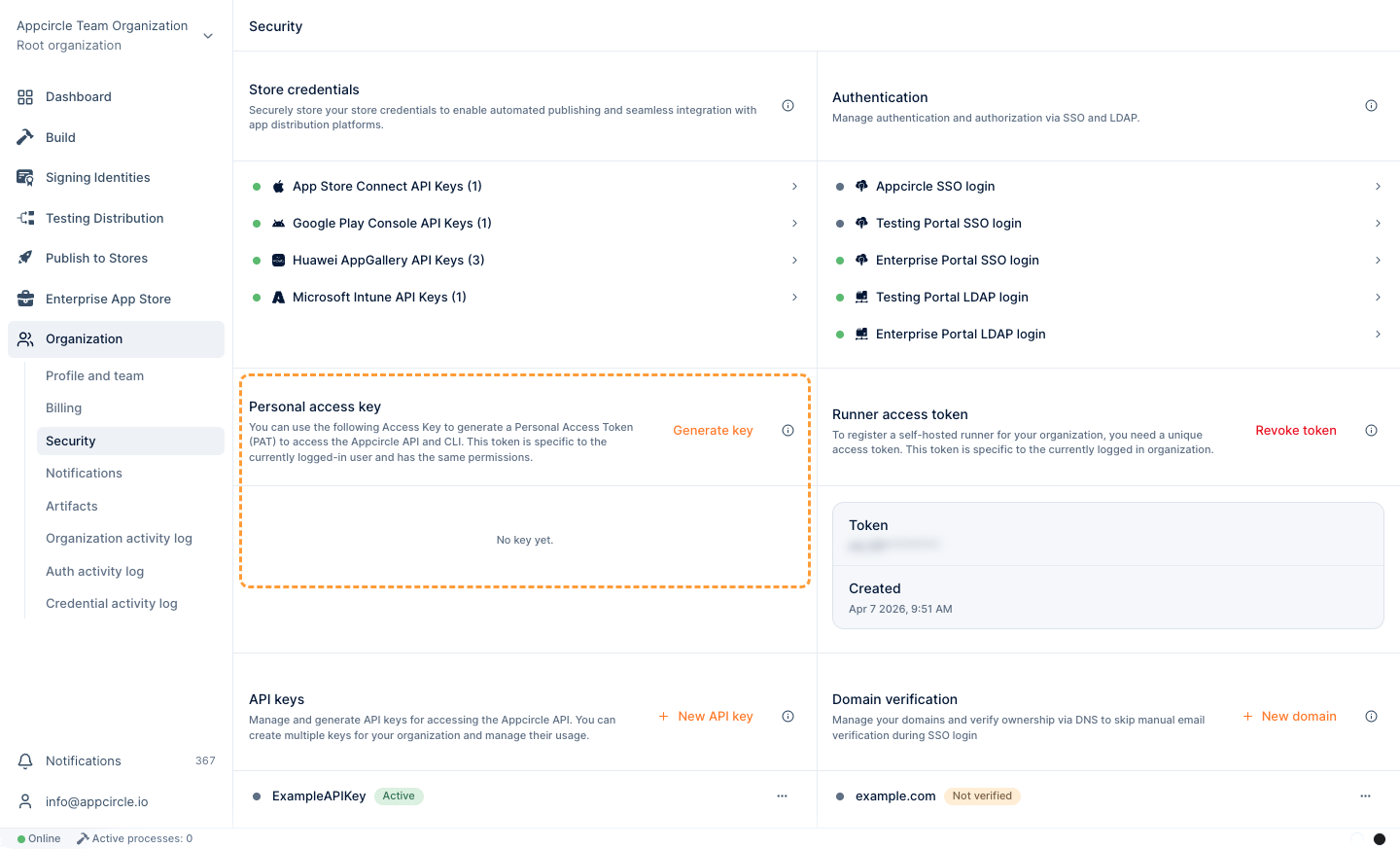
To generate a Personal Access Key:
- In the left sidebar, go to Organization > Security.
- Find the Personal access key section.
- Select Generate key to generate your first key.
What the Action Does
The action has two independent switches, upload and publish, both default to false. You must enable at least one. Create the Publish profile in Appcircle first; the action targets it by name (profile names are unique per platform).
upload | publish | Behavior |
|---|---|---|
true | false | Upload appPath as a new app version on the profile. |
false | true | Trigger the publish flow for the profile's current release candidate. |
true | true | Upload appPath, mark the new version as release candidate, then trigger the publish flow for it. |
false | false | Error — nothing to do. |
- In-progress guard: if a publish is already running for the target profile, the action does not start a new one and fails fast.
- Release candidate: when both
uploadandpublisharetrue, the freshly uploaded version is automatically marked as the release candidate before it is published. In publish-only mode, the profile's existing release candidate is published. - Progress: while publishing, the action polls the publish status and prints step-by-step progress until the flow succeeds or fails.
If the profile's publish flow contains a manual step (e.g. "Get Approval via Email"), the flow will wait for that action and the plugin will keep polling until it completes or the poll times out. For CI use, prefer publish flows without manual gates.
How to Add the Appcircle Publish Action to Your Pipeline
Upload only:
- name: Upload to Appcircle Publish
  uses: appcircleio/appcircle-publish-githubaction
  with:
    personalAPIToken: ${{ secrets.AC_PERSONAL_API_TOKEN }}
    platform: ios # or android
    publishProfile: PUBLISH_PROFILE_NAME
    upload: 'true'
    appPath: ./app.ipa
Publish only (publishes the profile's current release candidate):
- name: Trigger Appcircle Publish
  uses: appcircleio/appcircle-publish-githubaction
  with:
    personalAPIToken: ${{ secrets.AC_PERSONAL_API_TOKEN }}
    platform: ios
    publishProfile: PUBLISH_PROFILE_NAME
    publish: 'true'
Upload and publish (uploads, marks it release candidate, then publishes):
- name: Upload and Publish to Appcircle
  uses: appcircleio/appcircle-publish-githubaction
  with:
    personalAPIToken: ${{ secrets.AC_PERSONAL_API_TOKEN }}
    platform: android
    publishProfile: PUBLISH_PROFILE_NAME
    upload: 'true'
    publish: 'true'
    appPath: ./app.aab
Inputs
personalAPIToken(required): Appcircle Personal API Token used to authenticate and secure access to Appcircle services.platform(required): Target platform of the Publish profile,iosorandroid.publishProfile(required): Name of the Publish profile to target. Resolved to the profile for the selected platform.upload(optional, defaultfalse): UploadappPathas a new app version.publish(optional, defaultfalse): Trigger the profile's publish flow.appPath(required whenuploadistrue): Path to the application file. For iOS use a.ipafile; for Android use a.apkor.aabfile.authEndpoint/apiEndpoint(optional): self-hosted endpoints — see below.
Self-Hosted Appcircle
If you run a self-hosted Appcircle installation, point the action to your own servers with the optional authEndpoint and apiEndpoint inputs. When omitted, they default to the Appcircle cloud (https://auth.appcircle.io and https://api.appcircle.io), so existing cloud workflows keep working without any change.
- name: Trigger Appcircle Publish
  uses: appcircleio/appcircle-publish-githubaction
  with:
    personalAPIToken: ${{ secrets.AC_PERSONAL_API_TOKEN }}
    platform: ios
    publishProfile: PUBLISH_PROFILE_NAME
    publish: 'true'
    authEndpoint: https://auth.your-appcircle-domain.com
    apiEndpoint: https://api.your-appcircle-domain.com
authEndpoint: Base URL of the self-hosted Appcircle authentication server. Optional; defaults tohttps://auth.appcircle.io.apiEndpoint: Base URL of the self-hosted Appcircle API server. Optional; defaults tohttps://api.appcircle.io.
If your self-hosted Appcircle server uses a self-signed certificate (or one issued by a private/internal CA), requests will fail certificate validation. The action does not disable TLS verification. Trust the server's CA on the runner — set the NODE_EXTRA_CA_CERTS environment variable to a PEM file containing the CA certificate, or add the CA to the system certificate store.
Leveraging Environment Variables
Utilize environment variables seamlessly by substituting the parameters with ${{ envs.VARIABLE_NAME }} in your task inputs. The action automatically retrieves values from the specified environment variables within your pipeline.
Ensure that this action is added after build steps have been completed.
References
-
For details on generating an Appcircle Personal Access Key, visit Generating/Managing Personal Access Keys.
-
For more detailed instructions and support, visit the Appcircle Publish to Stores documentation.