Connection Guides
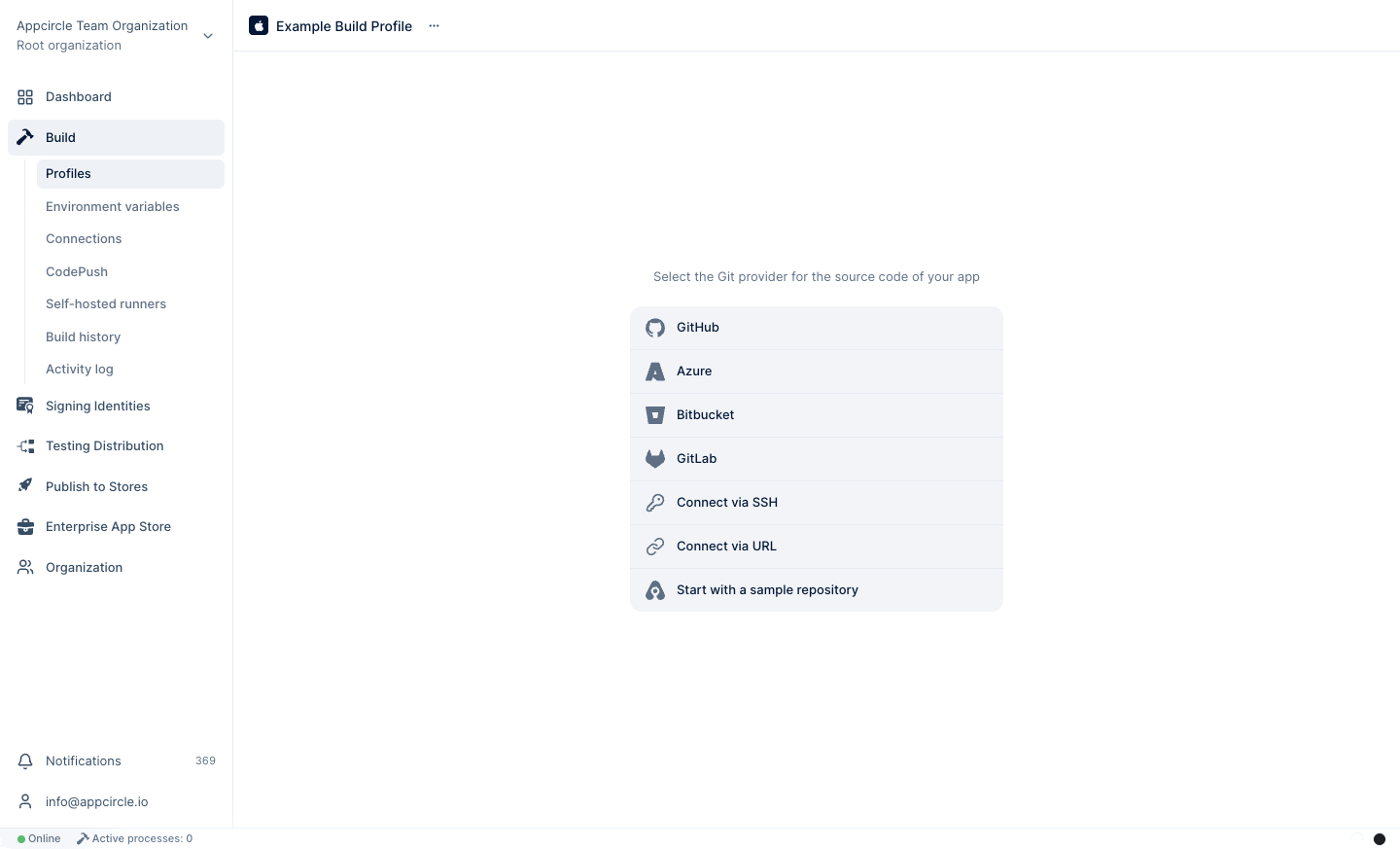
You can connect GitHub through a GitHub app or Bitbucket and GitLab repositories to your build profile through OAuth apps. Alternatively, you can connect private repositories through SSH and public repositories directly on GitHub, Bitbucket, GitLab, and other compatible Git providers such as Azure DevOps and AWS CodeCommit. (Please refer here for more information on AWS CodeCommit connections.)
You can also connect to your self-hosted Bitbucket and GitLab account directly within Appcircle.
If you authorize Appcircle to connect to your Github, BitBucket, or GitLab account, you can auto-build your project with hooks, get build statuses, and the full list of commits. If you connect to a repository through SSH or through a public URL, you need to set up webhooks manually.
When the "Autofill" toggle is activated on the Select Repository popup, Appcircle will try to create a default configuration using the selected repository and fill in the necessary fields.
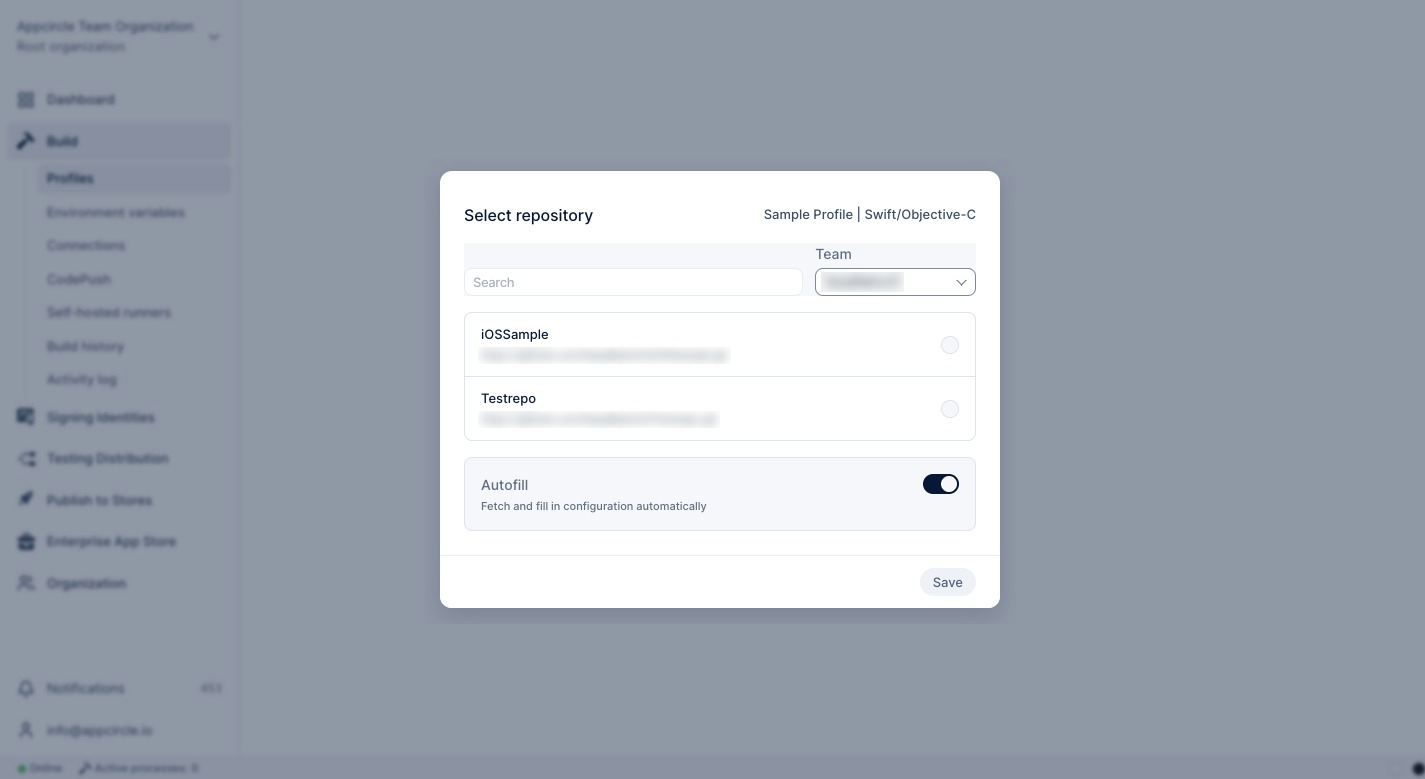
When you have exceeded the build limit of your plan, Appcircle will not be able to Autofill your build profile, although you activated the toggle.
You can refer to the links below for a detailed explanation on connecting a repository from GitHub, GitLab, Azure, and other platforms:
- Connecting to GitHub
- Connecting to GitLab
- Connecting to Bitbucket
- Connecting to Azure DevOps
- Connecting to Public Repository
- Connecting to Private Repository via SSH
- Connecting to Multiple Instances
Comparing Connection Methods
The connection method you choose decides which automation features are available for the build profile. OAuth, GitHub App, and Personal Access Token (PAT) connections use the Git provider's API, while SSH and public URL connections only give Git access to the repository.
| Feature | OAuth / GitHub App | PAT / Access Token | SSH | Public URL |
|---|---|---|---|---|
| Selecting the repository from a list | Yes | Yes | No, the repository URL is entered manually | No, the repository URL is entered manually |
| Listing branches and commits | Yes | Yes | Yes | Yes |
| Automatic webhook creation | Yes | Yes, if the token has webhook permissions | No, manual webhook only | No, manual webhook only |
| Push, pull/merge request, and tag triggers | Yes | Yes (with an automatic or manual webhook) | Yes, with a manual webhook | Yes, with a manual webhook |
| Commit build status | Yes | Yes, if the token can write commit statuses | No | No |
| Credential lifetime | Refreshed by Appcircle; reconnect if access is revoked | Until the token expires or is revoked | Until the key is removed | Not applicable |
| Self-hosted Git servers | No (cloud providers only) | Yes | Yes | Yes |
For webhook creation and permission details per provider, see Webhook Setup for OAuth and PAT-Based Repository Connections.
Commit Build Status
When Set Commit Build Status is enabled in the build configuration, Appcircle reports the build state to the commit in your Git provider. The status is updated when the build is queued, starts running, and when it succeeds, fails, times out, or is canceled (including builds canceled while still waiting in the queue).
Each status is named Appcircle/{Build Profile Name}/{Timestamp} and links back to the build in Appcircle. Long profile names are shortened.
Commit build status is sent with the token of the connection that owns the build profile. It is not sent for repositories connected via SSH or a public URL.
The provider-side requirements are:
| Provider | Requirement |
|---|---|
| GitHub | OAuth / GitHub App: granted during installation. Fine-grained PAT: Commit statuses: Read and write. Classic PAT: repo:status (or repo). The token owner needs write access to the repository. |
| GitLab | Token with the api scope and at least the Developer role on the project. The project's Repository feature must be enabled. Commit statuses are accepted even when the project's CI/CD feature is turned off. |
| Bitbucket Cloud | Repository read access is enough to write build statuses. Bitbucket only lets the user who created a status update it, so keep the same connection owner. |
| Bitbucket Server / Data Center | The token needs at least Repository read permission. |
| Azure DevOps | PAT scope Code (Status) (or Code (Read & write)). |
FAQ
Please note that currently only Git repositories are supported. Any third party version control repositories need to be transferred to a proper Git repository on either GitHub or Bitbucket.
Why is the commit build status not visible in my Git provider?
Check the following:
- Set Commit Build Status is enabled in the build profile configuration.
- The repository is not connected via SSH or a public URL. These connection types cannot send commit statuses.
- The connection token has the commit status permissions listed in Commit Build Status and has not expired or been revoked.
- GitLab only: The token owner has at least the Developer role on the project. GitLab rejects commit statuses from lower roles.
What happens when my PAT expires?
Appcircle can no longer refresh branches and commits, create webhooks, or send commit statuses with that connection. Create a new token in your Git provider and update it from Editing PAT Connections. Existing webhooks keep working because they don't use the token.
How to change your connected GitHub, Bitbucket, or GitLab account?
You will need to go to your GitHub, Bitbucket, or GitLab account and revoke access to Appcircle and then reconnect your account from Appcircle.
Unable to see the repositories in the connected repository provider
Please check if you have owner/admin access in the specific organization from which the repositories will be connected. Appcircle does not allow connections to the repositories with a member-level access.
Error accessing the repository. Please check if the repository exists or if you have the required privileges.
- Only members who have an admin role on the repository or are owners of the organization can install the GitHub app in an organization that owns that repository.
- Only members who have an admin role on a repository or are owners of the organization can connect a repository to a profile.
Should I use an OAuth or a PAT connection?
Use OAuth (or the GitHub App) for cloud providers when possible: Appcircle manages the token lifecycle, and webhooks and commit statuses work without extra permission settings. Use a PAT for self-hosted Git servers (GitLab Self-Managed, Bitbucket Server / Data Center, Azure DevOps Server, GitHub Enterprise), or when your organization does not allow OAuth apps. With a PAT, make sure the token has the webhook and commit status permissions listed in the provider guide, and renew it before it expires.
If you still can't solve your issues, ask on our Slack page. Our community and our support engineers will help you whenever they're available:
Need help?
Get help from Appcircle's support team, or see how others are using Appcircle by joining our Slack Channel.
