KOBIL Appshield Scanner for Android/iOS
KOBIL Appshield Scanner starts its analysis by accepting the application file (AAB/APK for Android, IPA for iOS) and performs dynamic runtime tests after initial file and format validations.
It is important to note that while many scanning solutions use ARM/x86_64 based emulators and sandbox environments, Appshield performs all these dynamic tests on real/physical Android and/or iOS devices.
At the end of the dynamic test session, Appshield indicates which security measures/hardenings are present and implemented in the app. If some test cases were to fail due to unforeseen errors or cannot be tested due to various bypass mechanisms implemented by the app itself, Appshield then starts a static, AI-powered analysis for the mentioned test cases to gather additional findings and then reaches a final verdict.
Prerequisites
For Android, APK or AAB format (signed) and for iOS, IPA format (signed) is required for KOBIL Appshield Scanner.
Before running the KOBIL Appshield Scanner step, here are some example steps/flows to obtain a signed AAB/APK/IPA file, illustrated below:
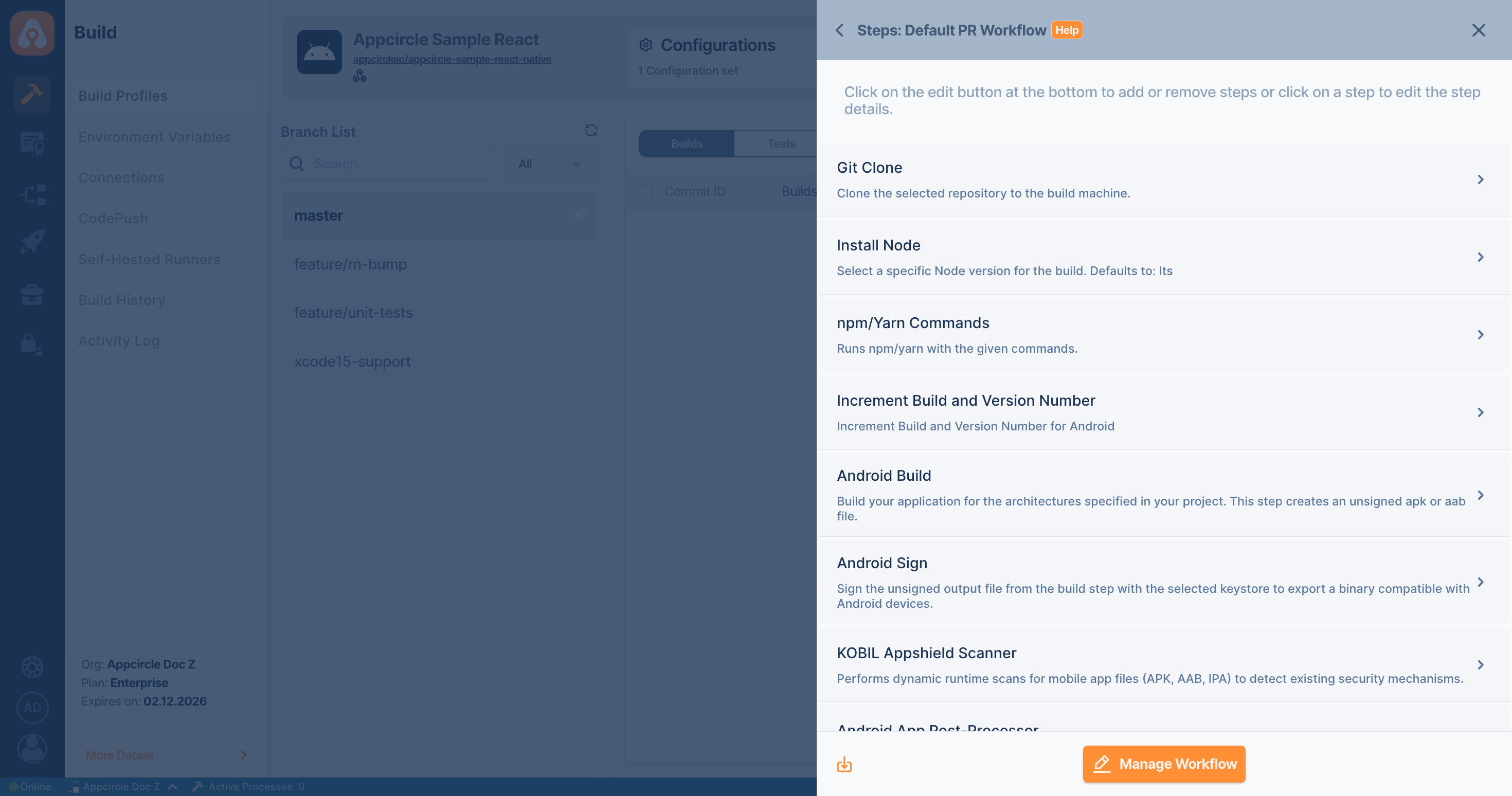
For Android (Java / Kotlin and React Native)
| Prerequisite Workflow Step | Description |
|---|---|
| Android Build | Generates the app required (APK or AAB) for the KOBIL Appshield Scanner step. |
| Android Sign | Required for signing the app (APK or AAB). If app is already signed, this step can be skipped. |
For Android Flutter
| Prerequisite Workflow Step | Description |
|---|---|
| Flutter Build for Android | Generates the app required (APK or AAB) for the KOBIL Appshield Scanner step. |
| Android Sign | Required for signing the app (APK or AAB). If app is already signed, this step can be skipped. |
For iOS (Objective-C / Swift and React Native)
| Prerequisite Workflow Step | Description |
|---|---|
| Xcodebuild for Devices | Builds the application in ARM architecture and generates an IPA file. |
For iOS Flutter
| Prerequisite Workflow Step | Description |
|---|---|
| Flutter Build for iOS | Prepares the Flutter project for the iOS environment and builds it using the Flutter SDK. |
| Xcodebuild for Devices | Builds the application in ARM architecture and generates an IPA file. |
Input Variables
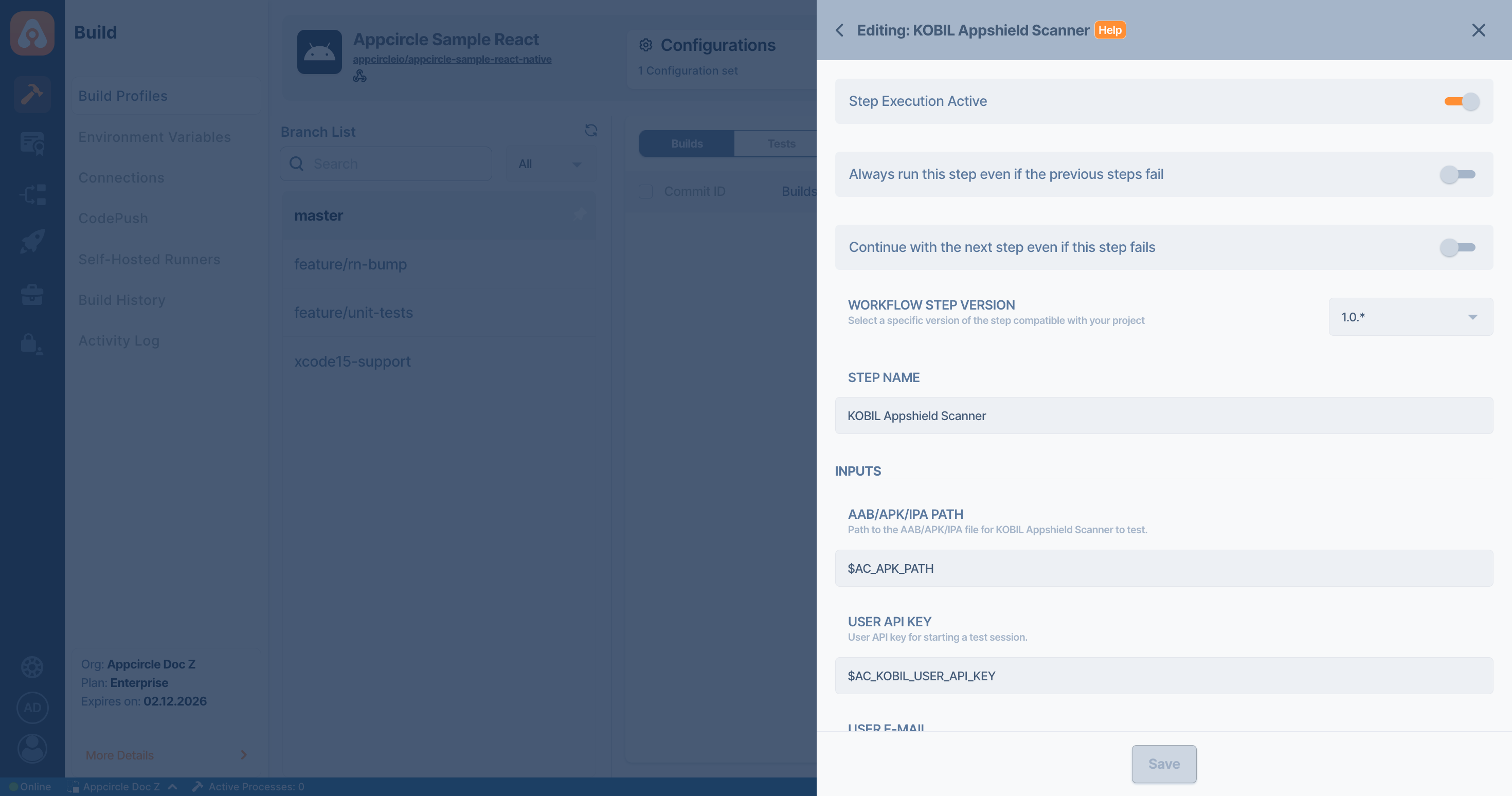
This step contains some input variable(s). It needs these variable(s) to work. The table below gives explanation for this variable(s).
Please do not use sensitive variables such as Username, Password, API Key, or Personal Access Key directly within the step.
We recommend using Environment Variables groups for such sensitive variables.
| Variable Name | Description | Status |
|---|---|---|
AC_APPSHIELD_APP_FILE_PATH | Path to the AAB/APK/IPA file for KOBIL Appshield Scanner to test. | Required |
AC_APPSHIELD_API_KEY | User API key for starting a test session. If not provided, default value from Appcircle can also be used by the component. | Required |
AC_APPSHIELD_USER_MAIL | Specifies the user e-mail if user wants to receive a detailed PDF report regarding the analysis. | Optional |
AC_APPSHIELD_UPLOAD_TIMEOUT | File upload timeout in seconds. | Optional |
Output Variables
The output(s) resulting from the operation of this component are as follows:
| Variable Name | Description |
|---|---|
AC_APPSHIELD_IS_APP_SECURE | Boolean variable indicating whether the app is properly hardened and contains the security/defense mechanisms. "true" indicates app is secure, "false" indicates app is not completely secure (has missing security measures), and "null" indicates the testing has failed for some internal reason. |
When the app is not secure, this step fails and breaks the pipeline. To prevent pipeline interruption, enable "Continue with the next step even if this step fails" toggle.
To access the source code of this component, please use the following link:
FAQ
What is KOBIL Appshield Scanner?
KOBIL Appshield Scanner is a mobile application security analysis tool for Android and iOS apps. It evaluates application security by combining dynamic runtime testing on real, physical devices with AI-supported static (file-based) analysis to determine whether an app is properly protected against common runtime attacks and tampering techniques.
What is KOBIL Appshield Scanner used for?
KOBIL Appshield Scanner is used to verify the presence and effectiveness of mobile app security hardening mechanisms. It helps development and security teams understand whether their Android or iOS applications are protected against threats such as debugging, hooking, code injection, screen capture, and device compromise (root or jailbreak).
What types of mobile apps can KOBIL Appshield Scanner analyze?
KOBIL Appshield Scanner supports Android and iOS mobile applications. It accepts AAB or APK files for Android and IPA files for iOS, performing both dynamic runtime testing and static analysis to evaluate the app’s overall security posture.
How is Appshield Scanner different from emulator-based security scanners?
Unlike many security scanners that rely on ARM or x86_64 emulators and sandbox environments, KOBIL Appshield Scanner performs dynamic runtime tests on real, physical Android and iOS devices. This approach allows more accurate detection of security mechanisms and reduces false positives or missed findings caused by emulator detection or bypass techniques.
What security protections does Appshield Scanner check for?
Appshield Scanner detects a wide range of mobile app security measures, including (but not limited to):
- Root and jailbreak detection
- Anti-debugging mechanisms
- Frida and anti-hooking protections
- Anti code injection defenses
- Screenshot and screen recording detection
- Screen mirroring detection
- Keylogger detection
- Tapjacking protection
What happens if some dynamic tests fail or cannot be executed?
If certain dynamic test cases fail due to unexpected runtime issues or because the app actively blocks analysis, Appshield Scanner automatically performs a static, AI-powered analysis for those specific test cases. The findings from both dynamic and static analysis are then combined to produce a final security verdict.
How can I tell if my app is considered secure after the scan?
After the scan completes, Appshield Scanner provides the output variable AC_APPSHIELD_IS_APP_SECURE:
trueindicates the app is properly hardened and contains the required security mechanismsfalseindicates some security measures are missingnullindicates the scan failed due to an internal or unexpected issue